XLTest helps you to check the integrity of your spreadsheets far more quickly than with tedious cell-by-cell inspection.
Buy XLTest for Excel 2003 now from Paypal. This also works in the Add-In tab of Excel 2007
If you own the book "Spreadsheet Check and Control" you save the cost of the book - 30 euro! Simply enter into the discount code box below the first word on the top left of page 131.
If you buy the spreadsheet inventory/assessment workbook ScanXLS you can get it free! Simply say you want XLTest free when placing your ScanXLS order.
To learn more, download the 19-page set of screenshots (1MB PDF) showing you what it does.
Buy now using PayPal which accepts most payment cards. XLTest will be sent by email in a zip file with documentation and sample workbooks. If your email system blocks zip files, please contact us to agree an alternative method of delivery.
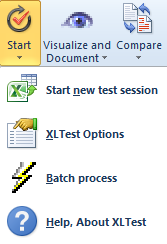
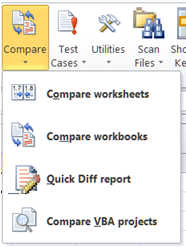
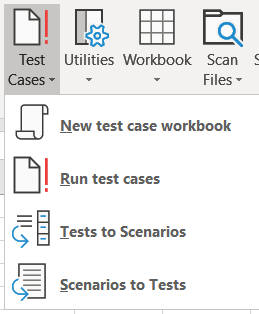
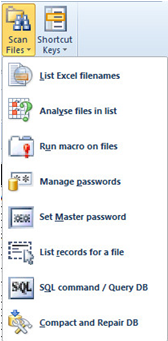
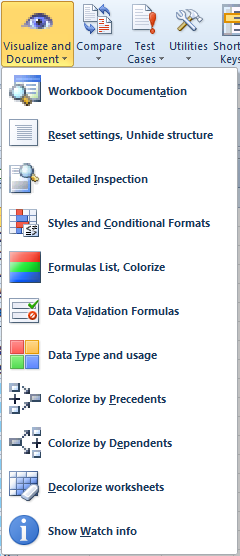
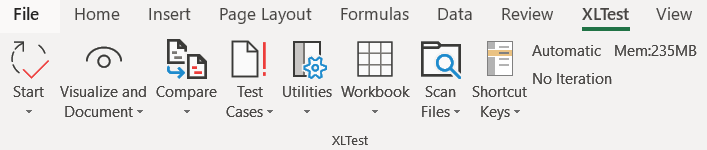
The XLTest toolbar
The menu popup key (default
Ctrl+Alt+x) will also show the
XLTest menu. It is yet another shortcut, perhaps of use to Excel 2007
users who
want a faster access than activating the Addin tab. XLTest also provides 14 extra
functions
that you can use in your spreadsheets.
Features |
Dialog | Sample screenshot |
| Start new test session: Open workbook for testing, start new log, $APP sheet | ![]() |
![]() |
| Create
$DOC sheet
for Workbook documentation Settings, Table of Contents, Properties, Internal and External links, Onactions, VBA statistics, Defined names, Styles, Number Formats, Cell comments, Flagged notes, Scenarios. |
![]() |
![]() |
| Reset workbook settings, hidden rows, columns, sheets | ![]() |
![]() |
| Create $INF
sheets of
detailed cell inspections This creates a sheet $INF that summarises the warnings on the sheet. The addresses are hyperlinked to a named range referring to the cells. The sheet lists the #Error values, the error and warnings checks, some formula statistics, a list of functions used, any circular reference chain, and the number formats in use. |
![]() |
![]() |
| List
/ Colour
cells by distinct formula (R1C1) Shows inconsistent formula blocks ![]() |
![]() |
![]() |
| List
/ Colour
Conditional Format Formulas Shows inconsistent conditional format rules ![]() |
![]() |
![]() |
| List /
Colour
Data Validation Formulas Shows inconsistent validation rules ![]() |
![]() |
![]() |
| Colours cells
by data type and input/output usage |
![]() |
![]() |
| Colour by
Precedents location This sheet, this book, External. ![]() |
![]() |
![]() |
Colour by
Dependents
location or count ![]() |
![]() |
![]() |
| Colour by Number
Format Shows inconsistent formatting |
![]() |
![]() |
| Watch: Keeps an info
window
open on current selection Shows details of cell content, format, validation, range name, etc |
![]() |
|
| Flag active cell for a table of contents | ![]() |
![]() |
| Add supporting sheets: $Readme, Palette, Table of Contents sheets | ![]() |
![]() |
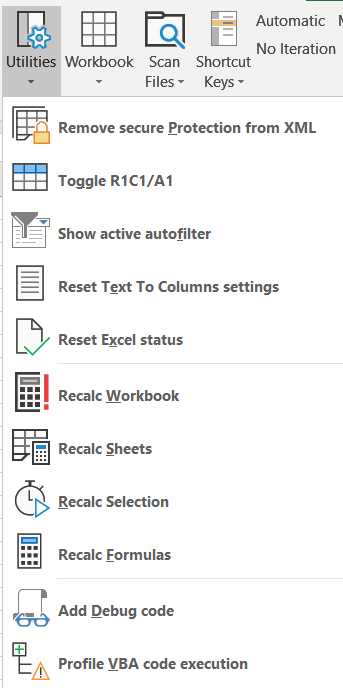
| Unprotect sheet Bypasses worksheet contents protection password |
![]() |
![]() |
| Compare two
workbooks
(same named sheets) It also compares VBA code. Compare two worksheets |
![]() |
![]() |
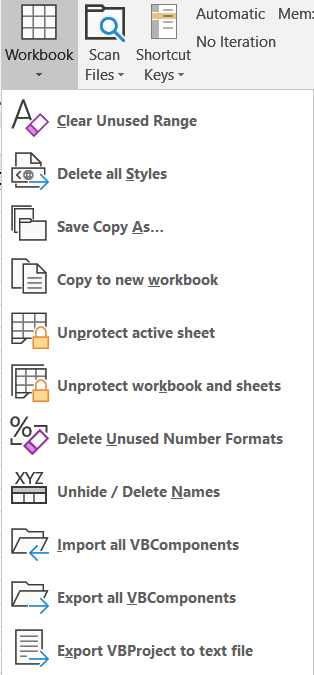
| Save Copy
As (saves a copy of the current workbook) |
||
| Options for what to search for when documenting | ![]() |
|
| Help on colours and keyboard shortcuts | ![]() ![]() |
|
| Run Test Cases and
scenarios XLTest can execute a set of test cases on a target workbook and stores the result of each test. You can use this for regression testing to verify that a new version performs the same as before, except of course for what you expect to have changed. Reset Excel's Text to Columns
parsing |
![]() |
![]() |
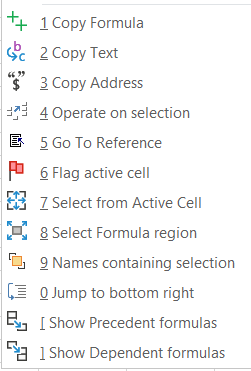
| Utilities
to navigate sheets and handle data. Copy Formula; Copy Text; Copy/Move selection; Go To Reference Flag active cell; Select from Active Cell; Select Formula Region Jump to Bottom Right of worksheet |
![]() |
![]() |
| Batch autotest process Runs all the above tests in a batch on all the worksheets of a workbook. It saves copies of the workbook with each colouring scheme. |
||
| New in version 1.10: Export / Import VB Components Send VB source folders to Diiff/WinMerge for comparison |
XLTest
provides these functions for use in your spreadsheets.
|
Function
|
Description |
Example
|
|
ColorName(
Colorindex ) |
Return
color name from index |
=ColorName(1) |
|
USTDate(
date ) |
Convert
text mm/dd/yyyy or mm-dd-yyyy to a date |
=USTDate("12/1/2008") |
|
EUTDate(
date ) |
Convert
text dd/mm/yyyy or dd-mm-yyyy to a date |
=EUTDate("12/1/2008") |
|
TextToDate(
text, format ) |
Convert
text to date specifying order and delimiter |
=TextToDate("08-02-09","mdy-") |
|
IsLike(
text, pattern ) |
True
if Text matches Pattern regular expression |
=IsLike("abc@def.ghi","*@*.???") |
|
Alphas(
text ) |
Returns
alphabetic characters in Text |
=Alphas(B5) |
|
Numerics(
text ) |
Returns
numeric characters in Text |
=Numerics(K5) |
|
TextToValue(
text, [minus], [decimal] ) |
Converts
text to number, optional negative and decimal symbols |
=TexttoValue("12.3-") |
|
GetFormula(
cell ) |
Returns
formula in a cell |
=GetFormula(K9) |
|
JoinValues(
range, delimiter ) |
Concatenates
range to a string list |
=JoinValues(G2:G15,",") |
|
SumN(
range ) |
Sums
non-formula numeric cells |
=SumN(A1:K10) |
|
FileSize
(filename ) |
Returns
size of a file given its name |
=FileSize("test103.xls") |
|
DateModified(
filename ) |
Returns
modified date of a file given its name |
=DateModified("somefile.xls") |
|
DirFile(
fileno, dirname, [attrib] ) |
Returns
the file name in the given position a directory |
=DirFile(1,"xl*.xla") |
Contact us for more information
_______________________________________________________
Book: Spreadsheet Check and Control: 47 best practices
to
detect
and prevent errors
|
http://www.sysmod.com/scc.htm |
ScanXLS: Spreadsheet inventory and risk assessment
|
http://www.sysmod.com/scanxls.htm |
|
|